2025-2026 · UX Designe Working Student

I interned at empiriecom and craft human-centric experiences for enterprise e-commerce solutions.

A Little Summary

Team

Shiyu Zhao

UX Design Intern

Jannes

UX Designer

Tina Stang

UX Designer

Andreas Schrader

UX Designer

Nikolai Horvat

Designer Manager
Skills

Product Thinking
User Research
Market Research
Brainstorming
UI / UX Design
Wireframes
Prototyping

Timeline

Oct ‘24– Feb '26
17 Weeks

Tools

Figma
Zeplin
After Effects
Photoshops
Illustrator
Atlassian
Microsoft Teams

Brief

Empiriecom is a technology service provider that helps large retailers build and operate full e-commerce systems from scratch. Its clients are therefore retailers and brand owners, not end consumers. The UX team I belonged to is responsible for design workflow consulting, accessibility audits, and direct involvement in the UX/UI design and delivery of products, with a strong emphasis on designing based on Behavior Patterns and Usability Heuristics.

As a working student here, I was mainly responsible for platform migrations, UX improvements, and the development of new features, including cutting-edge research on integrating AI concepts into the e-commerce platform.

In what follows, they are two of my key highlight projects.

Drupal Preview

Drupal Preview allows you to edit and verify the website building freely and effciently, without directly applying it to the working website.

02

01

AI Features

AI features including AI review summary, AI upselling, AI top infos and AI bundles upgrade your online shopping expeirence significantly.

Your Project Title

The subtitle or tagline here

Brief description of your first project feature.

Your Second Feature

Another tagline for the second piece

Brief description of your second project feature.

↑ Continue ↑

Drupal Preview

Brief

empiriecom’s CMS core content management system is built on the open-source Drupal framework, serving retail enterprise clients’ editorial teams for daily content operation. However, the current Drupal preview function failed to meet enterprise-level content preview requirements.

As the only designer embedded in the CMS team, I independently designed Drupal Preview from scratch, including defining user flows, crafting cross-device interaction logic, and designing the visual communication system. This design is scheduled to launch in March 2026 and will deliver a more efficient, flexible, and intuitive workflow for the Redakteure (content editors) at our retail clients.

Research

Our team identified a critical workflow risk: editors were testing content directly on the live system, rather than in a dedicated preview environment. The root cause was that the existing preview tool was too limited to replicate real publishing conditions. It showed only one fixed revision, with no way to simulate different languages, audiences, or publish dates.

I developed a comprehensive understanding of the Drupal Preview context by reviewing product documents and Jira tickets, collaborating across product, IT, and UX teams, and conducting UX/UI audits of comparable tools on the market. The goal was to define a design strategy that addressed the real pain points of editorial users at retail clients while remaining technically feasible and aligned with business goals.

IT team

Real-time parameter updates would increase data transmission frequency and compromise system response efficiency. Changes should only take effect on explicit user confirmation. 

Product Owner

The four core filter functions, Testdate, Language, Audience, Revisions, must carry equal visual weight. Show All Items and QR Code are to be integrated as key supporting components.

End Users (editors)

A Reset function is essential to address the pain points of multi-selection configuration scenarios.

UX/UI Audit

Most comparable features on the market currently adopt a drawer or floating widget design pattern.

A list of problems

that I gathered from PO, IT und End users.

01

No contextual content testing

Every change required exiting the preview entirely, navigating the backend, and re-entering. It became a disruptive loop that was being skipped in practice

02

Revision comparison was impossible

No revision selector meant comparing drafts required manually switching in the edit view and re-entering preview

03

Mobile preview had no tooling support

Testing on a real device meant copying a URL containing multiple dynamic parameters, and manually transferring it to a phone. There was no integrated handoff path.

04

Hidden content was invisible

Items excluded by audience rules, scheduling logic, or visibility settings were not surfaced in preview. Editors could not perform a full content audit without external workarounds.

05

The existing UI was not scalable

The static blue bar had no room for additional controls, no responsive behavior, and no visual hierarchy. As feature scope grew, patching the old surface became structurally impossible.

The Mission

How might we design a modern preview interface that lets editors validate any content under real publishing conditions without leaving the preview?

Opportunity

The collected pains points illuminate the path of design strategy.

Visual Form

Floating Widget

Replace the static bar with a freely positionable floating widget, which is a pattern familiar from modern tools. More spatial freedom, less content occlusion, and a contemporary feel aligned with how editorial teams think about contextual tooling.

Interaction

Staged Apply

No change takes effect immediately. Editors configure all parameters, including language, audience, date, revision, then confirm with a single Apply action. This reduces server load and gives editors full control before committing to a preview refresh.

Features

Complete Filter Suite

Integrate all six controls — Audience, Revisions, Language, Testdate, Show All Items, and QR Code — with equal visual weight for the four core filters and supporting status for the auxiliary features.

Device

Responsive by Design

Desktop and mobile share the same interaction logic but surface it differently. Mobile upgrades the compact bar to a larger touch-optimized panel with corner-snapping behavior, adapting for thumb reach and lower touch precision.

User Flow

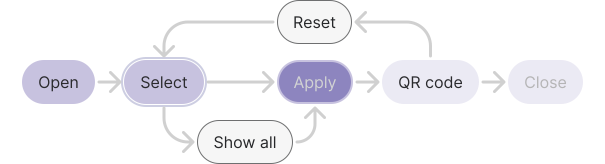
The interaction model follows a clear linear progression from left to right, reflecting the editor's natural decision sequence.

habpack-research

Design
Rationale

The bar follows the editor's left-to-right visual reading order. The four core filter controls, including Audience, Revisions, Language, Testdate, sit at equal weight on the left.

Show All Items, which is a toggle with different semantic value, is grouped alongside them but visually differentiated. Apply anchors the center as the primary action, with QR Code to its right as a post-confirm output. Reset is positioned last and deprioritized visually, because it's a low-frequency recovery action, not a primary operation.

Design Solutions

Modern

Immersive floating bar

A floating widget bar replaces the rigid fixed header. Minimal, dark-mode-first, and visually unobtrusive. Dark and light modes are both supported, aligned with tenant theme preferences.

On mobile, the compact floating bar upgrades to a larger-area control panel. Touch targets are enlarged, corner positioning replaces free-move, and the layout adapts for thumb-based operation.

Flexible

Free-move with corner snapping

The widget is freely draggable on desktop. When approaching a screen corner, it snaps automatically. On mobile, movement is restricted to corner positions only.

Space Efficient

Collapsible to a single CTA

The full bar can be collapsed to a minimal floating button, minimizing content occlusion during active editing. On mouse-out, all non-essential information hides automatically, reducing visual noise when the editor's focus is on the page content rather than the preview controls.

AI Features

Brief

Empiriecom runs several German e-commerce shops, including Universal, Quelle, Bader, and Otto Austria. As AI matured through 2024 and 2025, the company began looking for AI use cases with real customer value, not just branding.

The same pattern showed up across every category. The shops held vast amounts of useful data — thousands of reviews per product, full spec sheets, product relationships across the catalog — but customers couldn't reach it. Reviews went unread. Specs got buried. Recommendations were based on what people happened to buy together, not what actually fit. The problem wasn't missing information. It was missing structure. I worked on four AI features for the Product Detail Page, each tackling a different side of the same problem.

Design Solutions

Feature 01

AI Review Summary

AI Review Summary reads every review for a product and turns them into one short paragraph. It pulls out the most common strengths and weaknesses, and stays true to the rating distribution: a 4.5-star product reads like a 4.5-star product. Pro and con chips sit below the text. Each chip shows how many times that feedback was mentioned. Tap a chip to filter the reviews behind it.

Why
Most people don't read 200 reviews. They read five and form an opinion that's usually skewed — too positive if the five were good, too negative if they weren't. The summary fixes this. Customers get the full picture in seconds, weighted correctly. The mention counts matter too. They show the summary is grounded in real data, not invented by the AI. That's important for building trust in the first AI-generated content the shop has shown to users.
Feature 03

AI Top Infos

AI Top Infos pulls the two to five most important specs for each product category and shows them as small chips in the Buy Box. For example, resolution and screen size for TVs, capacity and spin speed for washing machines, battery life and noise cancellation for headphones. The product title gets shortened too. The long SEO version stays in the page metadata for search engines, but customers see a clean, readable name instead.

Why
A typical product page has 50+ specs, but customers only scan the top of the page. Most never reach the full table. The titles make it worse — written for search engines, they read like keyword soup: "Samsung Neo QLED 4K QN90C 65 Zoll Smart TV 2023 Series Quantum Matrix Technology Pro Dolby Atmos." What a customer actually needs is "Samsung Neo QLED 4K, 65 Zoll." By surfacing the right specs at the top and cleaning up the title, customers get what they need in seconds. Otto tested this combination across three iterations and multiple categories. It outperformed both the title alone and the title with the full spec block.
Feature 02

AI Upselling

AI Upselling shows one alternative to the product you're viewing in a small card next to the Buy Box. It picks one product, not twelve, and explains the trade-off in plain language: "This model offers 4K instead of 1080p for €50 more." The card shows the name, key facts, price difference, and rating.

Why
More options don't help, but slow people down. Showing twelve similar products leads to decision paralysis and lower conversion (the Paradox of Choice). One well-chosen alternative with a clear reason works better. It's the same logic that makes physical retail work: a good salesperson recommends one specific upgrade with one specific reason, not the whole shelf. The card is built around three things — a single comparison, a clear sense of what you'd miss without upgrading, and careful framing of the price so it reads as "small for what you get," not "expensive."
Feature 04

AI Bundle

AI Bundle suggests accessories that actually fit the product you're viewing. Instead of using "customers also bought" data, it looks at the main product's specifications, such as TV size, washing machine RPM, phone model, and finds items rated for those specs. Each suggestion comes with one short line explaining why it fits.

Why
Co-purchase data is noisy. People buy odd things together, and a frying pan showing up next to a washing machine doesn't mean they belong together. Matching on real specs makes the suggestions reliable. The short explanation does the rest: customers don't have to verify compatibility themselves, which is the main reason most cross-sell carousels get ignored.

Learnings

It was such an honor to join the empiriecom team for the second time, where I encountered new friends, amazing mentors, a new learning and working environment, and new challenges / opportunities. Working on a mostly design-initiative, exploratory project was quite an eye-opening experience for me, where I learned these key factors to keep improving as a UX designer.

Lesson 01

Personal ownership & persuasive skills

During the internship, I realized the importance of the ownership of a project and the effectiveness of communication between different collaborators across different teams. Without ownership over the project idea, effective communication between coworkers, and some team management skills, the collaboration progress can be significantly hindered by unbalanced resources, long and ineffective chats, and emotional frustration.

Lesson 02

Scope management when designing

I also realized the importance of effectively managing my personal scope and maintaining a comprehensive perspective when reviewing the progress of a project. There's a fair bit of a tendency for me to focus on minor details, which impedes my ability to generate new ideas and make meaningful improvements on a larger scale. As a result, some of my designs may lack persuasiveness and require additional effort to bring them to a satisfactory level.

You've reached the end!

Thank you for reading! You can check out more cool stuff by smashing either one of the following buttons...